
Arbiter
About This Project
The external-arbiter-operator (Arbiter) works with Rook-provisioned Ceph clusters to deploy external arbiters (monitors) that are not managed by Rook but that participate in consensus.
The operator also monitors the remote cluster to verify its availability and ensure that the tenant has sufficient permissions to handle the deployment of Arbiter.
Why Arbiter?
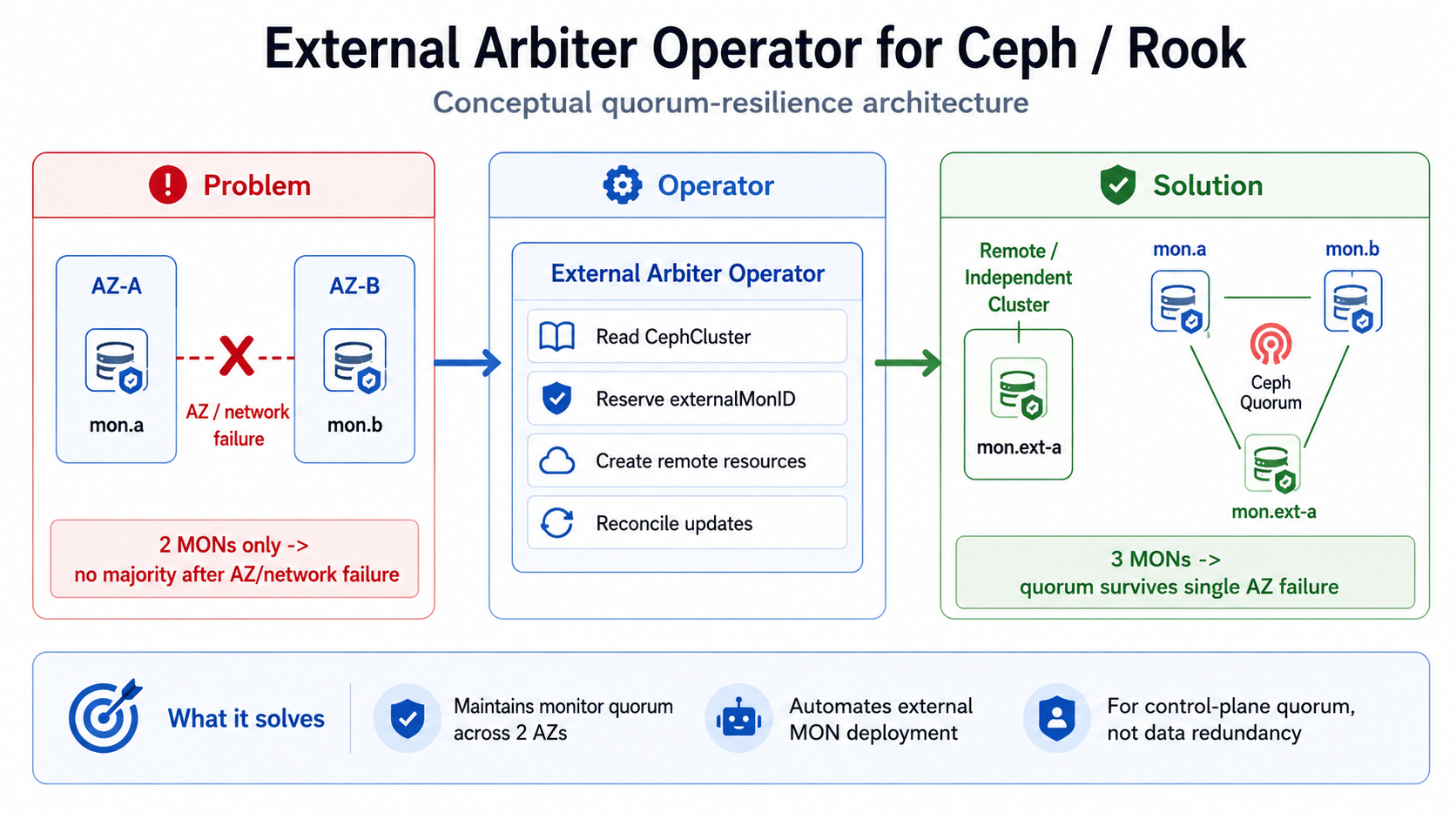
In a stretched Ceph cluster spanning two availability zones (AZ-A and AZ-B), monitors are split evenly between the two sites. If either AZ loses connectivity, neither side can reach a majority - the cluster is unable to make quorum decisions and becomes unavailable.
Arbiter deploys an external monitor (mon.ext-a) at a third site. This monitor does not store data but participates in quorum, so the cluster survives a full AZ failure:
Important scope
Arbiter restores control-plane quorum - it does not guarantee data redundancy. Data availability depends on OSD replication across the two primary sites.
How it works
The Arbiter operator provisions the external monitor before a failure occurs and continuously reconciles its desired state. During reconciliation, the operator:
- Reads the current Ceph cluster state
- Reserves an external monitor ID
- Deploys a lightweight monitor on the remote (tiebreaker) cluster
- Updates Ceph configuration so the new monitor joins quorum
The operator also continuously monitors the remote cluster to verify its availability and ensure the necessary RBAC permissions are in place.
Requirements and Setup
Required Tools
The following tools are required on your development machine:
sedopensslmakegitgolanglimakubectlnerdctl(available inside the Lima VM)helm
The remaining dependencies are provisioned via Go tools, including the Kubebuilder toolset.
Quick Start
What follows is a quick walkthrough on how to prepare the environment, run the operator locally, and deploy an external monitor.
Development topology
This quick start uses one Lima Kubernetes cluster for local development. It does not validate the failure isolation of a production stretched cluster, where the arbiter monitor must run in a separate failure domain.
Clone and Setup
# Clone the Arbiter repository
git clone https://github.com/cobaltcore-dev/external-arbiter-operator.git
cd external-arbiter-operator

# Install the development dependencies
make deps

# Clone the Rook manifests used below
git clone --depth 1 --branch v1.20.7 https://github.com/rook/rook.git

# Create OSD for Ceph
limactl disk create osd --size=8G

# Create VM instance
limactl create --name=k8s ./contrib/vm.yaml

# Start VM
limactl start k8s

# Use kubeconfig provided by VM
export KUBECONFIG="${HOME}/.lima/k8s/copied-from-guest/kubeconfig.yaml"
Install Prerequisites
# Install cert-manager
kubectl apply -f https://github.com/cert-manager/cert-manager/releases/download/v1.21.1/cert-manager.yaml

# Install Rook operator
kubectl apply -f ./rook/deploy/examples/crds.yaml
kubectl apply -f ./rook/deploy/examples/common.yaml
kubectl apply -f ./rook/deploy/examples/operator.yaml
kubectl apply -f ./rook/deploy/examples/csi-operator.yaml

# Create Ceph cluster
kubectl apply -f ./rook/deploy/examples/cluster-test.yaml
kubectl -n rook-ceph wait --for=condition=Ready cephcluster --all --timeout=15m

# Install the Ceph toolbox used by the verification step
kubectl apply -f ./rook/deploy/examples/toolbox.yaml
kubectl -n rook-ceph rollout status deployment/rook-ceph-tools --timeout=10m
Build and Install Operator
# Build image
limactl shell k8s sudo nerdctl --namespace k8s.io build \
  -t localhost:5000/cobaltcore-dev/external-arbiter-operator:latest \
  -f ./Dockerfile .

# Dry run operator install via Helm
helm install --dry-run --create-namespace --namespace arbiter-operator \
  --values ./contrib/charts/external-arbiter-operator/local.yaml \
  arbiter-operator ./contrib/charts/external-arbiter-operator

# Install operator via Helm chart
helm install --create-namespace --namespace arbiter-operator \
  --values ./contrib/charts/external-arbiter-operator/local.yaml \
  arbiter-operator ./contrib/charts/external-arbiter-operator
Configure and Deploy Arbiter
# Create namespace, user, role, rolebinding, kubeconfig and secret for arbiter
./hack/configure-k8s-user.sh

# Create secret with remote cluster access configuration
kubectl apply -f ./contrib/k8s/examples/secret.yaml -n arbiter-operator

# Create remote cluster resource
kubectl apply -f ./contrib/k8s/examples/remote-cluster.yaml -n arbiter-operator

# Create remote arbiter resource
kubectl apply -f ./contrib/k8s/examples/remote-arbiter.yaml -n arbiter-operator

# Watch until Arbiter is ready, then press Ctrl+C
kubectl get remotearbiter -n arbiter-operator -w

# Check that Arbiter has joined quorum
kubectl exec deployment/rook-ceph-tools -n rook-ceph -it -- ceph mon dump
Cleanup
# Delete managed resources while the operator can still finalize them
kubectl delete -f ./contrib/k8s/examples/remote-arbiter.yaml -n arbiter-operator
kubectl delete -f ./contrib/k8s/examples/remote-cluster.yaml -n arbiter-operator
kubectl delete -f ./contrib/k8s/examples/secret.yaml -n arbiter-operator

# Remove Helm chart
helm uninstall --namespace arbiter-operator arbiter-operator

# Stop VM
limactl stop k8s

# Delete VM
limactl delete k8s

# Delete the detached OSD disk
limactl disk delete osd
Make Goals
Useful make commands for development:
# Build binary
make

# Prettify project, run linters, etc.
make pretty

# Run tests
make test

# Regenerate Kubernetes resources
make gen

# Copy CRD definitions to Helm chart
make helm
Configuration
Deployment Configuration
Deployment manifests are managed by Helm. The values.yaml file lists all available configuration options.
Resource Configuration
The following example resources are provided:
secret.yaml- Kubeconfig secret for arbiter installationremote-cluster.yaml- RemoteCluster resource definitionremote-arbiter.yaml- RemoteArbiter resource definition
How to Run
Prerequisites
Before running the operator, ensure the following conditions are met:
- A Ceph cluster operated by Rook is already up and running on the source Kubernetes cluster
- Resources (pods, services) from the target (arbiter) cluster are reachable from the source (operator/Rook) cluster and vice versa
Deployment Steps
- Create a user on the target cluster.
- Create the target namespace on the target cluster.
- Grant the user permissions to manage deployments, secrets, configmaps, their statuses, and finalizers.
- Provision the target user kubeconfig on the source cluster via secret.
- Deploy the operator on the source cluster.
- Create a RemoteCluster resource on the source cluster, referencing the target user kubeconfig secret.
- Create a RemoteArbiter resource on the source cluster, referencing the RemoteCluster.
- Watch until resources are ready.
- Verify that the arbiter has joined the quorum by running
ceph mon dump.